The short version
We usually find a new listing within 1 to 2 minutes
Every alert shows a Found in time, such as Found in 1 minute. That is how long it took us to find the listing after it appeared on Facebook. On watchlists searched every minute or every 3 minutes, we find 9 out of 10 new listings within 2 minutes.
Facebook's own “listed 8 minutes ago” counts from an earlier moment: when the seller pressed Publish. Facebook then reviews each new listing, usually for about 7 minutes, before it shows up in Marketplace search. Until then it cannot be found by searching, so no alert app, including ours, can see it. That is why Facebook's listed time is usually several minutes older than our Found in time. It does not mean the listing sat there unnoticed.
1. Two different times
When you get an alert and open the listing, you will see two times. They measure different things.
| What you see | Where | Counts from | Usually reads |
|---|---|---|---|
| Found in 1 minute | On every Outpost alert: the dashboard, the iPhone app and Discord | The moment the listing first appears in Marketplace search | 1 to 2 minutes |
| Listed 8 minutes ago | On the listing itself, on Facebook | The moment the seller pressed Publish, including the time Facebook spent reviewing it | 8 to 9 minutes |
The gap between the two, usually about 7 minutes, is Facebook's review. During that time the listing cannot be found by searching Marketplace. The wait is the same for every buyer and every alert app, on every plan.
So when an alert says Found in 1 minute and Facebook says listed 8 minutes ago, you heard about the listing one minute after it could first be found. The other seven minutes happened before anyone could find it.
2. One listing, minute by minute
Here is an example, on a watchlist for “iPhone 13” that is searched every 3 minutes.
| Time | What happens |
|---|---|
| 9:00 | A seller presses Publish on an iPhone 13. Facebook's “listed” clock starts here. |
| 9:00 to 9:07 | Facebook reviews the listing. It is not in Marketplace search yet, so nobody can find it by searching and no alert app can see it. |
| 9:07 | The review finishes and the listing appears in Marketplace search. This is the first moment it can be found. |
| 9:08 | Your watchlist's next search finds it. We open the listing, check it really is an iPhone 13 and not a case or a charger, and send the alert. It says Found in 1 minute. |
| 9:08 | You tap the alert and open the listing. Facebook says listed 8 minutes ago. |
On a watchlist searched every 5 minutes, the same listing usually shows Found in 2 minutes, and Facebook says about 9. On Basic, which searches every 30 minutes, the wait for the next search is longer; section 4 has the numbers.
3. Why Facebook hides new listings
Facebook reviews new Marketplace listings to check they follow its rules before it shows them in search. For most listings this takes about 7 minutes. While it is happening, the listing does not come up in Marketplace search results, and there is no way for an outside service to see it early. Every alert app has the same wait.
Because Facebook's “listed” time starts at Publish, not at the end of the review, a listing that has only just become findable already reads “listed 7 minutes ago”. Add the minute or two it takes us to find it, and you get the 8 or 9 minutes you usually see on Facebook.
Some listings are held for much longer. Facebook keeps a share of new listings back for hours, and when they finally appear in search, Facebook already says “listed 5 hours ago”. We do not send those as alerts; section 6 explains why.
4. How fast on each plan
Each watchlist is searched on a fixed interval. How quickly we find a new listing depends mostly on how soon the next search comes round after the listing appears. Your plan sets the interval, and Standard and Pro also let you pick one watchlist to be searched faster than the rest. You choose it in the watchlist editor, under checked every.
These are the real numbers from every alert sent to every customer from 7 to 13 October 2026, a little over 5,000 alerts:
| Watchlist searched every | Plan | Found within 1 minute | Found within 2 minutes | Usual Found in time |
|---|---|---|---|---|
| 1 minute | Pro, your fastest watchlist | 96 out of 100 | 99 out of 100 | 1 minute |
| 3 minutes | Pro, or Standard's fastest watchlist | 64 out of 100 | 91 out of 100 | 1 minute |
| 5 minutes | Standard | 44 out of 100 | 62 out of 100 | 2 minutes, and 94 out of 100 within 5 |
| 30 minutes | Basic | 9 out of 100 | 11 out of 100 | About 14 minutes, up to 30 |
Across all plans together, half of all new listings were found within 2 minutes of appearing on Facebook, and three out of four within 3 minutes.
So on Standard and Pro, you hear about a new listing within a minute or two of the first moment it could be found. Basic is meant for items where those minutes do not decide the deal: it searches every 30 minutes, so a typical find takes about a quarter of an hour.
Which watchlist should be your fastest? The one where being first decides the deal. A reseller watching graphics cards, popular phones and a particular office chair would give the fast slot to the graphics cards, because a well-priced RTX 4090 is gone in minutes and the chair is not.
5. The Found in label
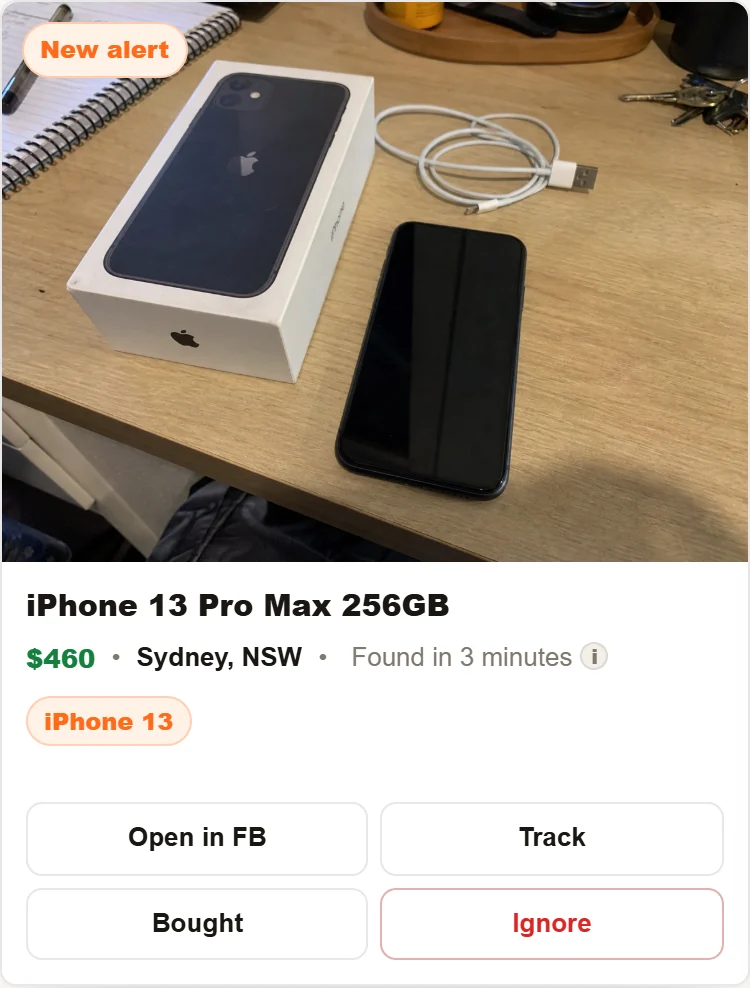
The Found in time is measured for each listing, from the moment it first appeared in Marketplace search to the moment we sent the alert. It never includes Facebook's review time. The same number appears in the dashboard, in the iPhone app's push notification and in Discord. Hover over or tap the small i next to it and the dashboard explains it too.
If one alert says Found in 4 minutes when most say 1, the listing most likely appeared just after a search and had to wait for the next one. That is normal on a watchlist searched every 5 minutes. If your watchlists are regularly slower than the table in section 4, tell us which ones and we will look.
Two cases show a listed time instead of a Found in time:
- Listings under Before your outpost started show Listed 9h ago, because no search found them new: they were already up when the watchlist began.
- If Facebook does not give a readable posting time for a listing, the alert shows how long ago it was listed instead.
6. Listings you will not be alerted to, and why
If you have seen a listing on Facebook and wondered why there was no alert, it is almost always one of these five.
- Facebook held it for hours
When a listing first appears in search already hours old, we do not send it. The exact rule: if a listing is older than 15 minutes plus twice your watchlist's search interval when we first see it, it is left out. On a 3-minute watchlist that is 21 minutes; on a 30-minute watchlist, 75 minutes. An alert that says “listed 5 hours ago” is not something you can be first to, so we treat it as not new.
Example: a seller posts a PS5 at 2 pm. Facebook holds it and it only appears in search at 7 pm. Your 7:01 pm search finds it, but it is five hours old, so no alert is sent.
- It was renewed or bumped
Sellers can renew a listing so it floats back to the top of search results. Its original posting date does not change. Anything older than 24 hours is never alerted, however often it reappears.
- It was already up when the watchlist started
A new watchlist's first search reads the last 24 hours. Those listings are shown under Before your outpost started on the Alerts tab, but they are not pushed to your phone or posted to Discord.
- It was posted during quiet hours
Quiet hours pause searching. When they end, listings posted during the window are hours old and are not sent. See the next section.
- The check decided it was not the item
Every match is checked against what you asked for. A hallway console table found by a “console” watchlist, or a phone case found by an “iPhone 13” watchlist, goes to the Ignored tab with the reason, not to your alerts. If one you wanted is there, press Restore, and read the watchlists guide for how to avoid it.
If a listing fits none of these and still did not alert, send us the Facebook link and the watchlist name. We can see exactly what happened on each search.
7. Quiet hours
Quiet hours are in Settings, then Alerts. Between the start and end times you set, in your time zone, searching pauses. No alerts, no Discord posts, no sound.
Listings posted during quiet hours are not sent afterwards. If quiet hours run from 10 pm to 7 am and someone posts a bargain at 11:30 pm, you will not get an alert for it at 7 am, because by then it is over seven hours old and treated like any other old listing. Quiet hours are for times you would never buy anyway. If you would happily wake up for a bargain, leave them off.
Check your time zone under Settings, then Account. If it is wrong, quiet hours will pause your searches at the wrong time of day.
8. Getting alerts sooner
- Put your most competitive item on your fastest watchlist. Standard searches it every 3 minutes, Pro every minute. Set it in the watchlist editor under “checked every”.
- Turn on push notifications in the iPhone app. It is the quickest way to your pocket.
- If you use Discord, set the channel to All Messages. Otherwise Discord shows the alert but does not buzz. See Make Discord ping your phone.
- Keep the Alerts tab open when you are at a desk. The sound plays the moment an alert lands.
- Keep your search term specific. A specific term means fewer wrong listings to check, and fewer alerts to scroll past when the one that matters arrives.
- Have your first message ready. The alert tells you the price and location. A short message you can paste, with a pickup time, is faster than typing one from scratch.
Common questions
The alert says Found in 1 minute, but Facebook says the listing is 8 minutes old. Which is right?
Both. Found in counts from when the listing appeared in Marketplace search. Facebook counts from when the seller pressed Publish, which includes about 7 minutes of review when nobody could find the listing by searching.
Does that mean other people saw it 7 minutes before me?
No. While Facebook is reviewing a listing, it does not come up in Marketplace search, and no alert app can see it. Once it appears, we usually find it within a minute or two.
Why does one alert say Found in 4 minutes when most say 1?
Each watchlist is searched on an interval. A listing that appears just after a search waits for the next one. On a watchlist searched every 5 minutes, most listings are found within 2 minutes and almost all within 5.
Is Pro faster than Standard?
Pro searches every watchlist every 3 minutes instead of every 5, and lets one watchlist be searched every minute. On that watchlist, 96 out of 100 new listings are found within 1 minute. Facebook's review time before a listing appears is the same on every plan.
Can you show me a listing before Facebook's review finishes?
No. Until Facebook shows a listing in Marketplace search, no outside service can see it. What we can do is find it within a minute or two of it appearing, and the Found in time shows you how quickly we did.
Do alerts come during quiet hours?
No. Searching pauses for the window you set, and listings posted during it are not sent when it ends.
Check your own alerts
Every alert on the dashboard shows its Found in time. If yours are regularly slower than the table in section 4, send us the watchlist name and a couple of examples and we will look at the searches.